


Create and manage mind maps in Microsoft Teams
Many of you are already familiar with Microsoft Teams, the Office 365 hub for team collaboration that integrates the people, content, and tools your team needs to be more engaged and effective. But did you know that Microsoft Teams also has a powerful collaborative mind-mapping feature? This integrated tool from MindMeister can help you visualize ideas and create plans with your team members, all in real-time, within Microsoft Teams.
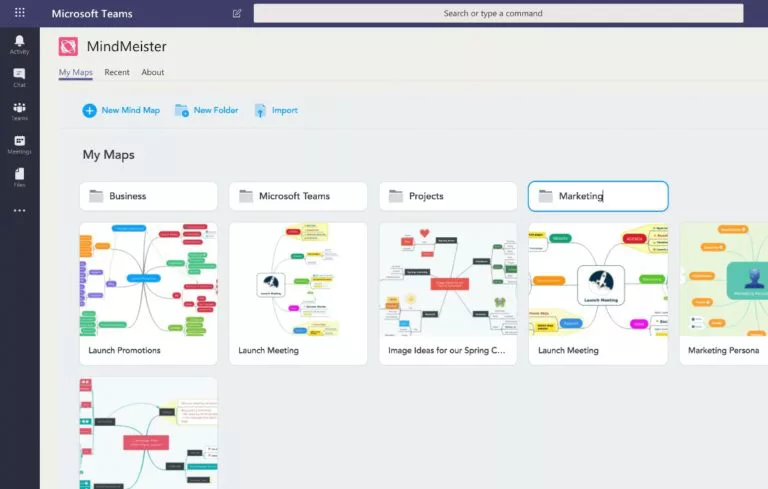
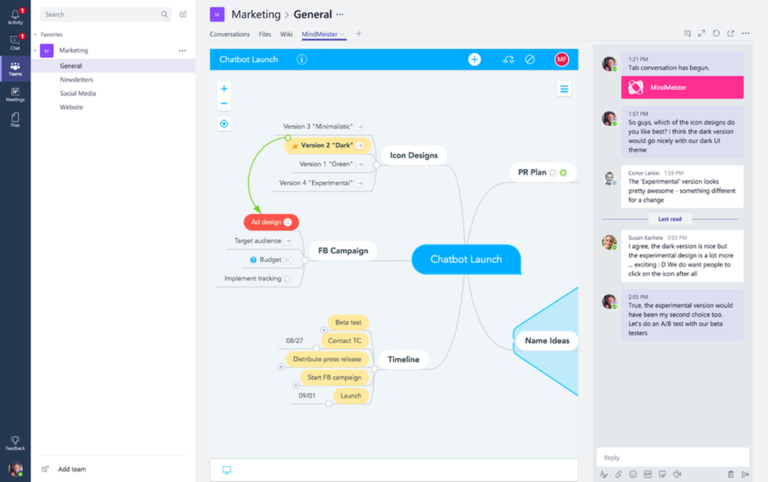
Mind Mapping in Microsoft Teams
For those unfamiliar with mind maps, a mind map is a simple and effective way to brainstorm thoughts and ideas organically without worrying about order and structure1. Mind maps allow you to visually collect and display all the important information around a topic on a single page, making it easy for you to review and update key points. And with MindMeister for Microsoft Teams, you can create and collaboratively edit your mind maps right inside your Microsoft Teams channels.
This integrated ability enables you to organize and manage all your mind maps without having to switch between different tools. In other words, you can take notes, brainstorm ideas, visualize project plans, and outline strategies while you’re discussing the details with your team members in the chat…. all within Microsoft Teams2.
Ready to Get Started with Microsoft Teams?
There are so many great benefits of Microsoft Teams, and the integrated mind-mapping capability from MindMeister is yet another example of just how powerful Microsoft Teams can be. If you are ready to get started with Microsoft Teams, just know that our Imaginet Teams experts can help. To find out more, schedule your free consultation call with Imaginet today.
Thank you for reading this post! If you enjoyed it, I encourage you to check out some of our other content on this blog. We have a range of articles on various topics that I think you’ll find interesting. Don’t forget to subscribe to our newsletter to stay updated with all of the latest information on Imaginet’s recent successful projects

discover more

Uses of Intune in a Remote Work Environment
Microsoft Intune is the perfect solution to help you manage and secure your remote work environment. It provides easy access to all your apps, data, and resources while ensuring compliance…

Project Transfer Strategies
Learn how to facilitate the transfer of a project from one team to another with these project transfer strategies. A well-planned hand-off, gradual transition, and embedding knowledge in the infrastructure…
Understanding Organization-Wide Signatures and Disclaimers in M365
Organization-wide signatures and disclaimers are a valuable feature in Microsoft 365 (M365) for creating a consistent and professional appearance for all emails sent from your organization. These signatures can include…
Let’s build something amazing together
From concept to handoff, we’d love to learn more about what you are working on.
Send us a message below or call us at 1-800-989-6022.