



Mastering Subagents in VS Code + Copilot: How To Actually Use Them
December 11, 2025
If you’ve ever dumped a giant problem into Copilot Chat and watched the conversation slowly turn into spaghetti, subagents are the feature you’ve been waiting for.
Think of subagents as specialized mini-Copilots you spin up on demand. You hand them a self-contained problem: refactor this mess, write tests for that file, scan the workspace for security issues – and they go off and do the heavy lifting in an isolated context while you keep working.
They landed in VS Code v1.107 (December 2025) as part of the GitHub Copilot Chat experience, and they’re one of those things that feels “nice to have” at first… right up until you use them properly and suddenly, you’re annoyed they didn’t exist years ago.
In this post, I’ll walk through:
- What subagents actually are
- How they behave under the hood
- Concrete dev scenarios where they shine
- Sample prompts and orchestration patterns
- Safety, limitations, and some “don’t be that dev” advice
What Subagents Are (In Plain English)
A subagent is a dedicated Copilot Chat session that runs in isolation from your main conversation.
- You invoke it with #runSubagent inside Copilot Chat.
- Copilot spins up a fresh “mini-agent” with its own instructions and tools.
- It usually works in a separate Git worktree so your main workspace doesn’t get trashed.
- When it’s done, it hands you back artifacts: diffs, summaries, test results, etc.
So instead of:

You do:

Why This Matters
Subagents are built around a few key ideas:
- Isolation: They do their work in a separate context, often in a new worktree. If it breaks, your main workspace doesn’t care.
- Autonomy: Once you kick it off, it can run multi-step flows without you babysitting every command.
- Focus: One subagent = one job. No polluted chat history. No “scroll-of-doom” to remember what you asked for.
This is not “just run Copilot harder.” It’s a different way of structuring how you collaborate with the AI.
What Subagents Can Actually Do
Subagents extend Copilot from “chatty autocomplete” into something closer to a lightweight automation layer.
Here’s what they’re good at:
- Task delegation: Offload focused work like refactors, test generation, security scans, docs, etc.
- Tool integration: They can use tools (file search, code edits, terminal commands-subject to your approval) to actually change things instead of just talking about it.
- Background-ish work: They can run longer tasks while you keep using the main chat. You don’t have to sit there glued to one thread.
- Context management: They work in isolated sessions / worktrees, so giant changes don’t land in your main working directory until you say so.
- Multi-step orchestration: “Analyze the code → propose changes → apply them → run tests → summarize” can all be part of a single subagent flow.
Limitations You Should Know Upfront
Subagents are powerful, but not magic:
- No nesting, a subagent cannot invoke another subagent. No agent pyramids.
- Tools must be enabled, if the tools icon (hammer/wrench) in Copilot Chat isn’t enabled, you’re not getting the full experience.
- Prompt quality still matters, ague in → vague out. You know the drill.
- Still evolving, some areas are experimental; org settings and policies can restrict what they can do.
Where Subagents Shine: Real Dev Scenarios
Let’s talk about situations where this isn’t theory-this is just smart laziness.
1.Refactoring Legacy Code Without Losing Your Mind
Situation: You’ve got a massive legacy.js with mixed concerns, weird patterns, and “do not touch” vibes.
Prompt:

What happens:
- Subagent analyzes the file in isolation.
- Proposes refactors and applies them outside your main workspace.
- Gives you a diff so you can review like a normal human instead of blindly trusting it.
You stay in control. It does the grunt work.
2. Generating and Running Tests (Without Setting Everything Up Manually)
Situation: You’ve just built a Node.js API. Tests are “on the list” but you don’t want to spend your whole afternoon wiring up Jest.
Prompt:

What happens:
- Subagent generates test files.
- Runs npm test via tools (with your approval).
- Summarizes what passed, what failed, and where coverage is thin.
You can then refine specific tests manually, instead of starting from zero.
3. Security Pass Before a Release
Situation: You’re about to cut a release of a Python app and you want a quick security sanity check.
Prompt:

What happens:
- Subagent sweeps the workspace.
- Runs static analysis tools (e.g., Bandit or similar, depending on what it has access to).
- Reports potential issues + suggested patches in an isolated branch/worktree.
You get an actionable list instead of vague “maybe this is bad” vibes.
4. Documentation You’ve Been Putting Off
Situation: You have a React component library. The code works, but the docs are… let’s call them “aspirational.”
Prompt:

What happens:
- Subagent goes through the components, adds JSDoc where it makes sense.
- Generates or updates a README.
- Optionally prepares a commit ready for you to review.
You still own the doc quality-but the bulk of the writing and formatting is handled.
5. Debugging Multi-Service Nightmares
Situation: There’s a production issue involving several services, logs are scattered, and nobody wants to spelunk through them.
Prompt:

What happens:
- Subagent pulls in related logs and code.
- Proposes a hypothesis, tests it where possible, and hands you a concise summary of likely root causes and candidate fixes.
You’re still the one shipping the fix-but you’re not starting from a blank terminal.
How to Actually Invoke Subagents
First, make sure tools are enabled in Copilot Chat (click the hammer/wrench icon).
Basic Invocation
You can call a subagent explicitly:

Sometimes Copilot will suggest using a subagent automatically for more complex tasks-accepting that suggestion gives you the same behavior, just with a friendlier UI.
Orchestration Patterns That Work Well
Subagents really start paying off when you think in multi-step flows instead of one-off prompts.
1. Multi-Step Refactor
Prompt:
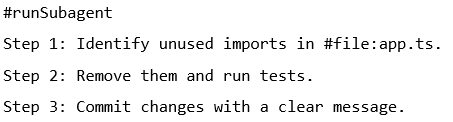
You’ve basically handed it a small plan. It executes, and you just review.
2. Code Generation + Validation
Prompt:

The key here is that the subagent doesn’t just generate code; it also checks for conflicts and reports back.
3.Background Maintenance Task
Prompt:

You can keep working in your main chat while this grindy task runs elsewhere.
4. Pairing with Plan Mode
Plan Mode is great at outlining big changes. Subagents are great at executing pieces of that plan.
Prompt:

You get structure and execution, without losing track of what’s happening.
Safety, Governance, and “Don’t Shoot Yourself in the Foot”
Subagents are powerful because they can:
- Run terminal commands
- Modify files
- Commit changes
That’s exactly why you don’t just blindly approve everything.
Practical Safety Habits
- Read prompts before approving tools, if Copilot wants to run a command, make sure it’s something you’d actually type yourself.
- Prefer isolated worktrees/branches, let subagents experiment away from your main development branch.
- Review diffs like normal PRs, subagent output is not exempt from review just because AI wrote it.
- Be careful with sensitive data, don’t paste secrets, internal tokens, or anything compliance would yell at you about.
If you’re in a company environment, admins may have policies that restrict tools and subagent behavior. Respect that-those policies exist for a reason.
Getting Your Team Comfortable with Subagents
If you’re introducing this to a team, don’t pitch it as “AI will write all our code.” Instead:
- Start with non-critical tasks (docs, small refactors, test scaffolding).
- Agree on a review standard: everything generated by an agent is treated like code from a junior dev-reviewed carefully, but not dismissed.
- Encourage people to share prompt patterns that worked well (and those that failed).
- Use CI as the final gate: tests, linters, and checks don’t care whether a human or subagent wrote the change.
When You Should Not Use a Subagent
Just because you can doesn’t mean you should.
Skip subagents for:
- Tiny changes you can type faster than you can describe.
- One-liners or trivial fixes.
- Anything that requires deep product judgment rather than mechanical work.
Save them for:
- Tasks that would take you 30+ minutes.
- Multi-file or multi-step changes.
- Work that’s boring but important: cleanup, tests, audits, updates, etc.
Quick Best Practices Cheat Sheet
If you want the TL;DR:
- Be specific in your prompts, file paths, expected outputs, and constraints.
- Use them for complexity, not laziness, subagents shine when the task is structured but heavy.
- Combine Plan Mode + subagents, plan big, execute small.
- Review everything, treat subagent output like any other code contribution.
- Iterate, after each run, ask: “What could I have told the subagent to make this result better?” Then bake that into the next prompt.
Related Microsoft Docs
Manage chat sessions
VS Code November 2025 (version 1.107)
Wrap-Up
Subagents turn Copilot from “assistant that answers questions” into “assistant that actually does work for you in the background, safely.”
Once you get comfortable with:
- Choosing the right tasks
- Writing clear multi-step prompts
- Reviewing outputs like a responsible dev
…they become a natural part of your workflow: analyze here, refactor there, generate tests over there, all without turning your main chat into chaos.
Pick one scenario from this post: legacy refactor, test generation, security scan, docs-and try it with #runSubagent in your own codebase. See how far you can push it, then tighten your prompts and repeat.
After that, start crafting your own real-world scenarios that normally eat your time and run those through subagents too. And if you land on a workflow that feels like a cheat code, share it with your team or online so other devs can steal it and build on it.
That’s how you go from “neat feature” to “how did I ever work without this.”
Thanks for reading! Make sure to subscribe to our blog. We publish technology tips, tricks, and updates every week. If you’re looking for a tech solution, we can help. Fill out the form at the bottom of the page and someone will be in touch.
Want to hear the latest from out team of experts? Sign up to receive the latest news right to your inbox. You may unsubscribe at anytime.

Discover More

Integration Between Power Platform and SharePoint Encourages Innovation
Organizations are focusing on innovation, streamlining their processes, and delivering better experiences for employees and customers. Power Platform and SharePoint are the Microsoft products that are helping organizations focus on…

5 Common Misconceptions About Cloud Migration: Debunking the Myths
We’ve all heard of the cloud and cloud migration. But how important is it actually for your business? Organizations are moving to the cloud for several reasons: to improve agility,…

Innovation Starts with Listening: Co-Creating Software with End Users
Innovation is key. But with our race to innovate, it’s tempting to focus on speed, features, and technical brilliance. But the most transformative software solutions often don’t begin with code,…

Let’s build something amazing together
From concept to handoff, we’d love to learn more about what you are working on.
Send us a message below or call us at 1-800-989-6022.